Robotic Ultrasound Utilities#
This folder contains utility tools for the robotic ultrasound simulation workflow, including a visualization application that provides real-time monitoring of camera feeds, ultrasound imagery, and robot state.
Overview#
The utilities in this directory support the robotic ultrasound simulation pipeline with tools for:
- Visualization: Real-time display of camera feeds, ultrasound images, and robot state
Usage#
To run the visualization:
python -m utils.visualization
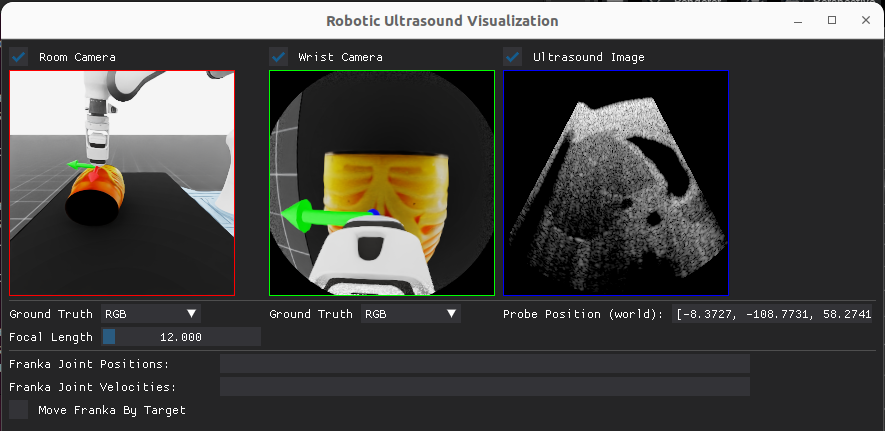
This will open a GUI that displays multiple real-time feeds:
- Room camera view (RGB or depth)
- Wrist camera view (RGB or depth)
- Ultrasound image with probe position information
Data Flow Architecture#
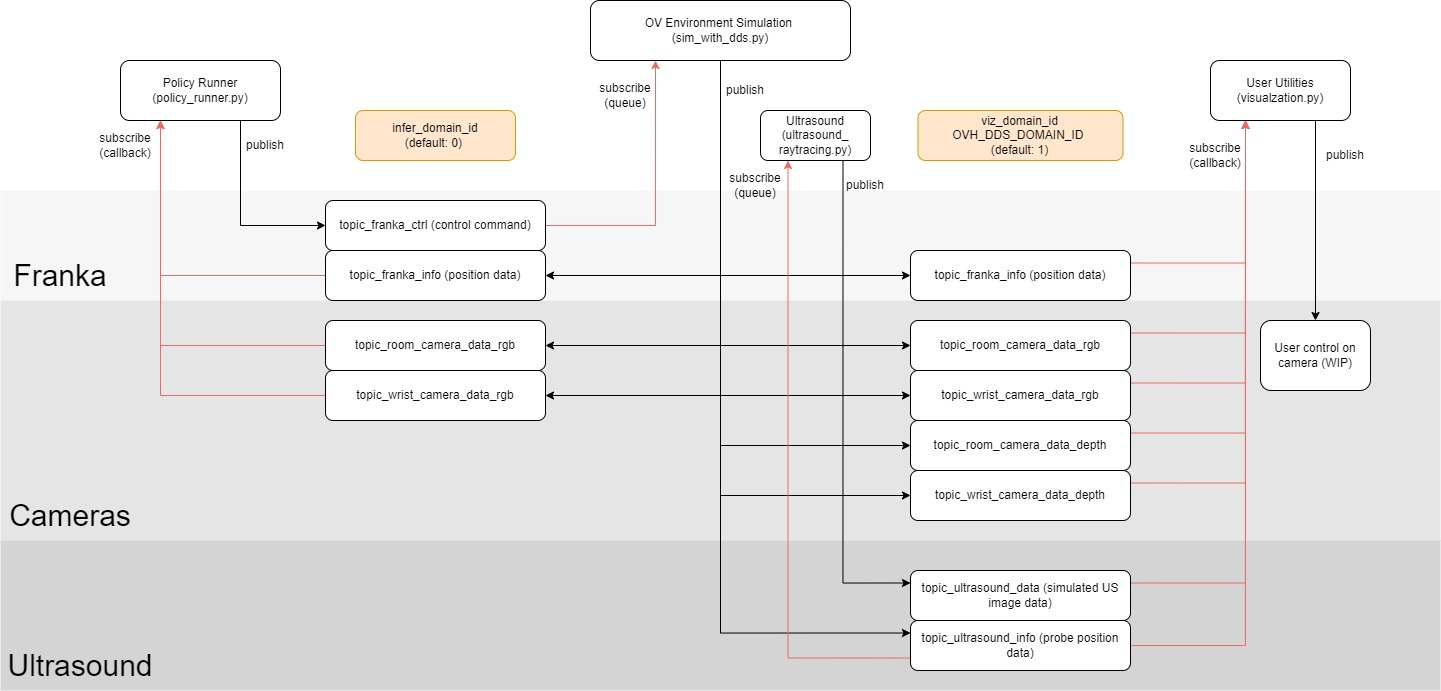
The visualization application connects to simulated or real data through DDS (Data Distribution Service), a publish-subscribe middleware that enables real-time data exchange between components.
Policy Running Pipeline#
When running with sim_with_dds.py:
Camera Data Flow#
sim_with_dds.pyspawns an Isaac Sim environment with virtual cameras- Environment captures RGB/depth images from both room and wrist cameras
- Images are published to DDS topics (
topic_room_camera_data_rgb,topic_wrist_camera_data_rgb, etc.) - The visualization app subscribes to these topics via
RoomCamPublisherandWristCamPublisherclasses - When data arrives, the app processes and displays them in real-time in the GUI
Robot State Flow#
- Current robot joint positions are captured and published to
topic_franka_info - Ultrasound probe pose is published to
topic_ultrasound_info - Visualization displays this data in the interface
Policy Control Loop#
run_policy.pysubscribes to the same camera and robot state topics- The policy generates actions and publishes to
topic_franka_ctrl sim_with_dds.pyapplies these actions to the robot in simulation- This closed-loop cycle enables autonomous robot control while visualization shows the process
Teleoperation Pipeline#
When running with teleop_se3_agent.py:
Camera & Robot Teleoperation#
teleop_se3_agent.pycreates the simulation environment- User controls the robot via keyboard or 3D spacemouse
- Camera views (RGB/depth) are published to the same DDS topics
- Robot state is published as in the inference pipeline
- Visualization receives and displays the same data, but control comes from the human operator
Ultrasound Image Simulation#
The ultrasound image is separately simulated and published:
Ultrasound Raytracing#
ultrasound_raytracing.pyruns a physics-based ultrasound simulator (using NVIDIA RaySim)- It subscribes to the probe position via
topic_ultrasound_info - Computes realistic ultrasound images based on where the probe contacts the virtual anatomy
- Publishes ultrasound image data to
topic_ultrasound_data - Visualization receives and displays these images alongside camera views
DDS Topic Structure#
The visualization application connects to these key topics:
- Room camera:
topic_room_camera_data_rgbandtopic_room_camera_data_depth - Wrist camera:
topic_wrist_camera_data_rgbandtopic_wrist_camera_data_depth - Robot state:
topic_franka_info - Probe position:
topic_ultrasound_info - Ultrasound image:
topic_ultrasound_data
Each subscriber is implemented as a separate Python thread, allowing asynchronous updates to the UI as data becomes available from different sources. The visualization tool's modular design allows it to connect to either simulated environments or potentially real hardware using the same DDS interface.
Troubleshooting#
Common Issues#
- No data displayed: Ensure the corresponding simulation or data source is running and publishing data to the expected topics.
- Missing camera feeds: Verify that the DDS domain IDs match between publishers and subscribers. If issues persist:
- Try using different domain IDs for each topic to avoid conflicts
- Add a short delay (time.sleep) after initialization to ensure publishers and subscribers are properly established
- Check network connectivity if running across multiple machines