Agentic Workflow#
Unified IsaacLab-Arena + GR00T/openpi workflow for registered policy and validation environments.
Requirements#
Before running setup.sh:
- Ubuntu 22.04 or 24.04 on
x86_64oraarch64. uvonPATH.gitonPATHfor third-party checkouts.- Network access to GitHub, PyPI, NVIDIA PyPI, and PyTorch CUDA wheels.
- NVIDIA GPU with Linux driver
580.65.06or newer for Isaac Sim 5.1 / CUDA 13. - ~30 GB free disk
- Optional Cosmos visual expansion: Docker with GPU support, plus
HF_TOKENorHUGGING_FACE_HUB_TOKENafter accepting the NVIDIA Cosmos model license.
Setup#
workflows/agentic/setup.sh
Cosmos is optional because it may build/check a Docker image:
workflows/agentic/setup.sh --with-cosmos
Supported Environments#
| Env id | Robot | HF model |
|---|---|---|
scissor_pick_and_place |
SO-ARM 101 | nvidia/SO_ARM_Starter_Gr00t (N1.7 alt: nvidia/SO_ARM_Starter_Gr00tN17) |
locomanip_tray_pick_and_place |
Unitree G1 | nvidia/GR00T-N1.6-Rheo-PickNPlaceTray |
locomanip_push_cart |
Unitree G1 | nvidia/GR00T-N1.6-Rheo-Sim-PushCart |
assemble_trocar |
Unitree G1 | nvidia/GR00T-N1.5-RL-Rheo-AssembleTrocar |
ultrasound_liver_scan |
Franka-style arm | nvidia/Liver_Scan_Pi0_Cosmos_Rel |
surgical_reach_psm |
dVRK PSM | nvidia/GR00T-N1.5-3B |
surgical_reach_dual_psm |
dVRK dual PSM | nvidia/GR00T-N1.5-3B |
surgical_reach_star |
STAR | nvidia/GR00T-N1.5-3B |
surgical_lift_block |
dVRK PSM | nvidia/GR00T-N1.5-3B |
surgical_lift_needle |
dVRK PSM | nvidia/GR00T-N1.5-3B |
surgical_lift_needle_organs |
dVRK PSM | nvidia/GR00T-N1.5-3B |
Subprojects#
arena/— Simulator entry point for registered environments, policy rollouts, teleop recording, and HDF5 replay.policy/— Env-to-policy dispatcher for GR00T/openpi inference daemons and training CLIs.mimic/— Lightweight HDF5 demo expansion by copying trajectories and adding small action/state noise.dataset/— Arena HDF5 to LeRobot dataset conversion, including metadata, videos, and modality defaults.annotator/— VLM-based success labeling for recorded episodes and live camera frames.cosmos/— Optional NVIDIA Cosmos Transfer pipeline for visual variation of recorded camera streams.
Each environment is configured by one YAML file in config/environments/.
Quick Run#
Try the following prompts in Claude Code, Codex, or Local Agent. Verified using: Opus 4.8 (1M context) and GPT 5.5.
When running Claude Code, Codex, or Local Agent for these skills/prompts, use effort level to
low/medium.
Each block below is one or more natural-language prompts to paste into Claude Code, Codex, or Local Agent — not shell commands. The agent loads the matching skill from the table further down to execute them. Estimates are for cached re-runs; first runs are typically 5–10x longer due to model and Isaac Sim asset downloads.
Existing Environments#
# Setup (~2 mins)
What does the i4h workflow include, and where should I start?
Set up the i4h workflow on this machine and tell me if any host requirements are missing.

# Run Evaluation (using pretrained HF models)
# (~3 mins with isaacsim first launch)
Evaluate scissor pick and place for 2 episodes.
Replay second episode.

# Dataset/VLM Annotation (using Qwen3-VL-8B)
# (~2 mins with local VLM)
Run Annotation on all recorded episodes and summarize.

# Run Evaluation for others (using pretrained HF models)
# (~2 mins per env)
Evaluate ultrasound for 1 episode.
Evaluate trocar assembly for 1 episode.
Evaluate locomanip tray pick and place for 1 episode.
Evaluate locomanip push cart for 1 episode.

# Surgical state-machine smoke runs (no policy server)
Run surgical_reach_psm with the state machine for 1 episode.
Run surgical_lift_needle with the state machine for 1 episode.

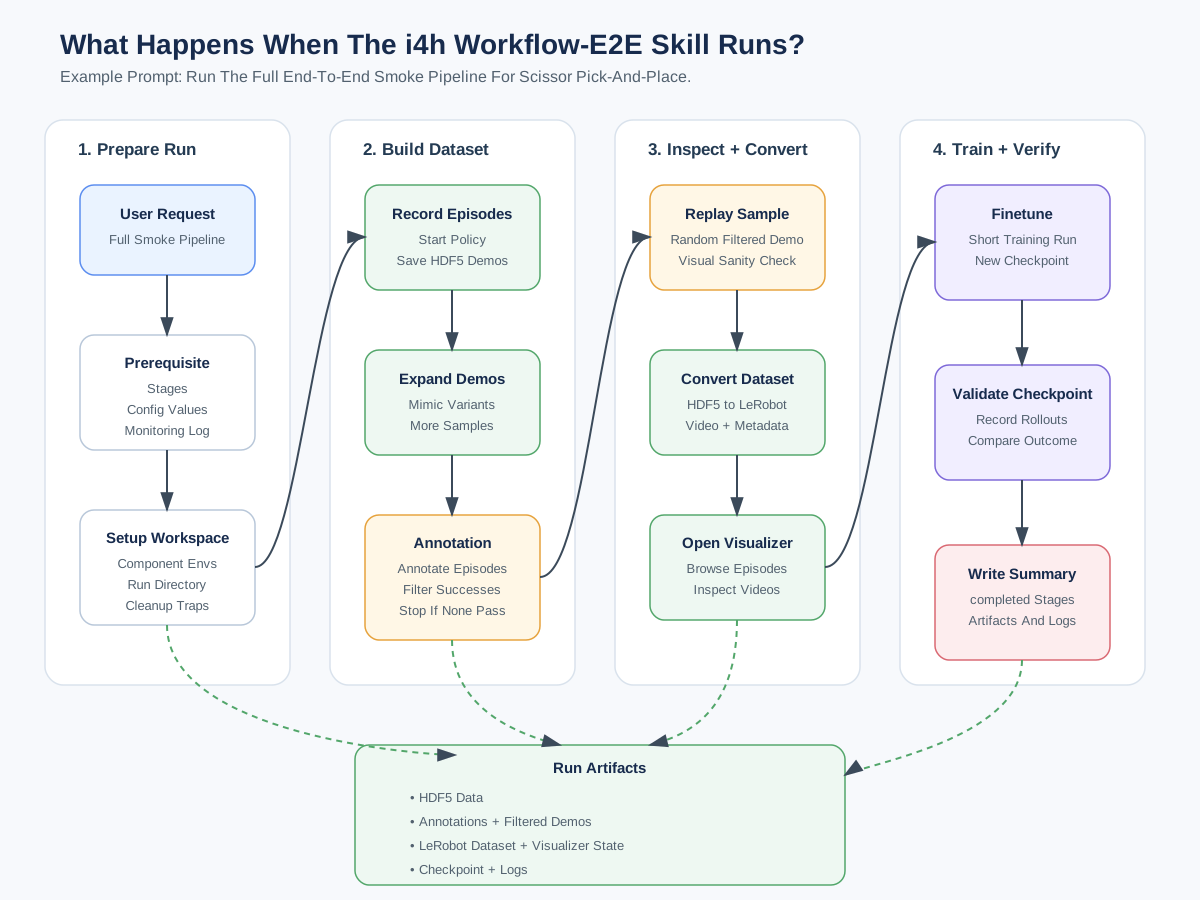
# Run E2E (record -> mimic -> annotate/filter -> replay -> convert -> visualize -> finetune -> validate)
# (~10 mins)
Run end-to-end smoke pipeline for scissor pick-and-place.

# Stop
Stop all
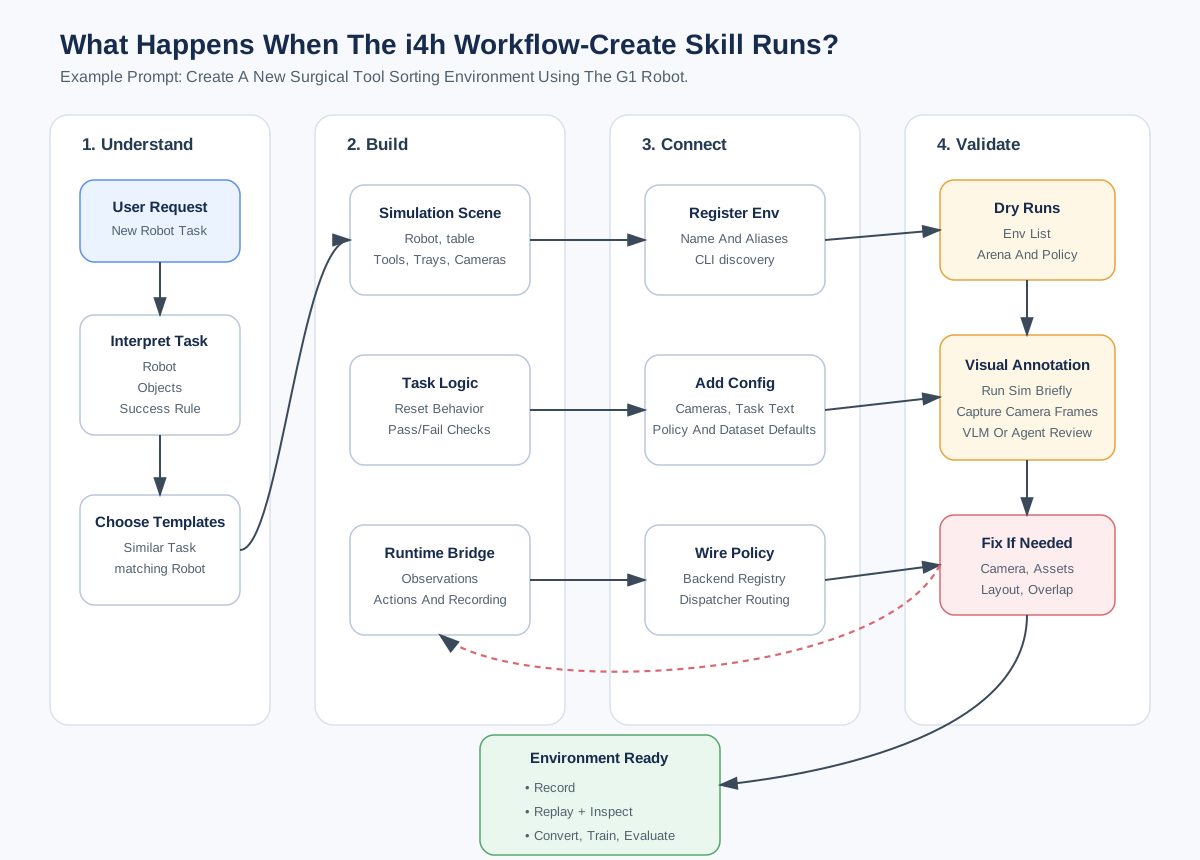
Creating New Environment#
# Create env/workflow: (scissor_pick_and_place → Unitree G1 → gr00t_n16 → nvidia/GR00T-N1.6-3B)
# (~10 mins)
Create a new i4h environment for surgical tool sorting using G1 based on scissor_pick_and_place.

# Edit Scene (~4 mins)
Edit the scene for new env in live mode.
  - Add new red cube on table.
  - Increase size of red cube by 2x.
  - Shift G1 to the opposite side of the table and 4 ft away from table.
  - Add a room camera based on current perspective view to capture room area.
  - Bake all changes and stop.

# Teleop/Finetune/Eval (~20 mins)
Change policy task description to "Walk towards surgical table"

Run teleop for 5 episodes.
Mimic 3 more episodes and visualize my dataset.
Finetune for 200 steps with batch size of 32.  Turn off vision tuning.
Run eval using new checkpoint for 300 timesteps.

# Stop
Stop all
Workflow Skills#
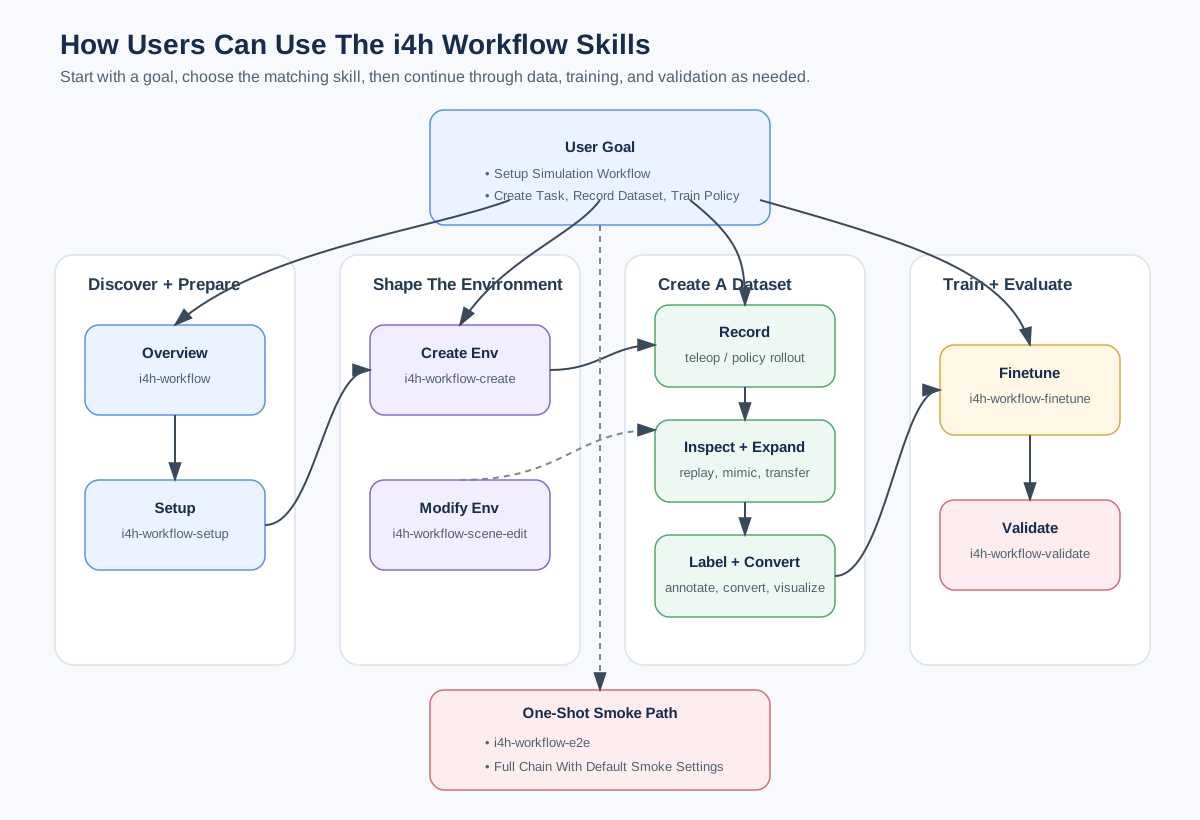
Use these prompts with the repository skills in skills/.
Status legend: ✓ verified, ◐ partial / known limitations, ○ not verified.
| Skill | Description | Example prompt |
|---|---|---|
✓ i4h-workflow |
Overview of the unified IsaacLab-Arena + GR00T/openpi workflow and where to start. | What does the i4h workflow include, and where should I start? |
✓ i4h-workflow-setup |
Verify host requirements and run setup. | Set up the i4h workflow on this machine and tell me if any host requirements are missing. |
✓ i4h-workflow-create |
Create a new agentic environment from an existing template, including scene, task, YAML, and policy registration. | SO-ARM 101: Create a new i4h environment by forking the scissor pick-and-place task for surgical tool sorting.G1: Create a new i4h environment by forking the scissor pick-and-place task for surgical tool sorting using G1 robot. |
✓ i4h-workflow-scene-edit |
Edit an existing environment's scene in place, such as moving/scaling objects, swapping props, adjusting cameras, robot placement, task language, success bounds, or randomization. | Edit the scissor pick-and-place scene to replace the scissors with a red cube and save the scene. |
◐ i4h-workflow-dataset-teleop |
Record teleoperated Arena episodes into HDF5 using keyboard or the SO-ARM leader arm. | Record 5 keyboard teleop demos for the scissor pick-and-place task. |
✓ i4h-workflow-dataset-replay |
Replay recorded HDF5 episodes inside Isaac Sim for visual verification. | Replay episode 0 from my scissor pick-and-place recording in Isaac Sim. |
✓ i4h-workflow-dataset-mimic |
Expand an HDF5 recording by copying trajectories and adding small action/state noise. | Expand my scissor pick-and-place recording to 10 episodes with small action and state noise. |
✓ i4h-workflow-dataset-annotate |
Use a VLM to label whether HDF5 episodes or live camera frames satisfy the task. | Run the VLM annotator on my scissor pick-and-place recording and label which episodes satisfy the task. |
✓ i4h-workflow-dataset-convert |
Convert an Arena HDF5 recording into a LeRobot dataset for visualization or training. | Convert my scissor pick-and-place recording into a LeRobot dataset. |
✓ i4h-lerobot-viz |
Serve the LeRobot HTML visualizer for inspecting converted datasets in a browser. | Serve the LeRobot visualizer for my converted scissor pick-and-place dataset and show me the local URL. |
◐ i4h-workflow-finetune |
Fine-tune a GR00T or openpi PI0 policy on a converted LeRobot dataset. | Fine-tune a policy for the scissor pick-and-place task on my converted dataset for a short smoke run. |
✓ i4h-workflow-validate |
Evaluate a configured policy or checkpoint by recording rollout episodes; annotate only when requested. | Evaluate scissor pick and place with 3 episodes. |
◐ i4h-workflow-e2e |
Run the full smoke pipeline from setup and recording through mimic, annotation, conversion, finetuning, and validation. | Run the full end-to-end smoke pipeline for the scissor pick-and-place task. |
Additional Notes:
- ◐
i4h-workflow-dataset-teleop: keyboard ✓, keyboard_23 ✓, so-arm-leader ✓, manus-gloves ✗ - ◐
i4h-workflow-finetune: scissor_pick_and_place ✓, others ✗ - ◐
i4h-workflow-e2e: scissor_pick_and_place ✓, others ✗
Quick E2E CLI Run#
workflows/agentic/scripts/e2e/run.sh --env scissor_pick_and_place --dry-run
workflows/agentic/scripts/e2e/run.sh --env scissor_pick_and_place --skip-mimic --skip-annotate --skip-replay --skip-viz
tail -f workflows/agentic/runs/.latest/logs/workflow.log
Appendix#