Hospital Digital Twin#
The Goal#
Hospitals are complex, high-stakes environments where robots could assist with repetitive and physically demanding tasks — ultrasound scanning, surgical instrument handling, patient monitoring, and more. Building robust robot capabilities for these settings requires large amounts of high-quality demonstration data collected in simulation before deployment. The foundation of this approach is a digital twin: a simulation that mirrors the hospital workspace, the robot, and the task, so that data generated in simulation transfers meaningfully to the real world.
This tutorial series walks through how to build a complete hospital automation simulation workflow using NVIDIA's technology: from defining the physical environment, configuring a robot embodiment, collecting human demonstrations, all the way to generating large synthetic datasets for training and validation.
The Pipeline#
flowchart LR
    subgraph EC["Environment Creation"]
        NuRec("NuRec") --> Scene("Scene")
        ISA("IsaacSim Authoring") --> Scene
        ISA --> Embodiment("Embodiment")
        Scene --> Arena("IsaacLabArenaEnvironment")
        Embodiment --> Arena
        Task("Task") --> Arena
    end

    subgraph DC["Data Collection"]
        TR("Teleoperation & Recording")
    end

    subgraph DG["Data Augmentation"]
        TM("Trajectory Multiplication") --> SA("Style Augmentation")
    end

    EC --> DC
    DC --> DG
Environment Creation#
The environment is the digital twin of the hospital workspace. It is composed of three independent pieces assembled together:
- Scene — the physical world: background room, furniture, and physics-enabled objects that can be randomised per episode. → 01 Scene Creation
- Embodiment — the robot: joints, actuators, action space, observations, and reset behaviour. → 02 Embodiment
- Task — the objective: success condition, scene randomisation events, subtask signals for MimicGen, and metrics. → 03 Task Definition
Once defined, they are assembled and compiled into a standard Gymnasium environment that you can launch interactively to verify everything is in place before collecting data. → 04 Environment Launching
Data Collection#
A human operator drives the robot through the task using a teleoperation device — keyboard, SpaceMouse, gamepad, or XR hand-tracking. Successful episodes are recorded as HDF5 files containing the action sequence, observations, and initial simulation state. A small set of demonstrations (10–50) is typically enough to seed the next stage. → 05 Teleoperation and Recording
Data Augmentation#
-
MimicGen takes the recorded trajectories and generates a much larger synthetic dataset by transferring subtask segments to new object configurations — turning 10 human demos into thousands of training episodes without additional human effort. → 06 Trajectory Multiplication
-
Cosmos-transfer applies visual domain randomisation — varying lighting, textures, and camera characteristics — to produce datasets that are more robust for sim-to-real transfer. → Style Augmentation
Relevant Technologies#
Isaac Sim is the physics and rendering engine. You use it to author assets — placing meshes, configuring physics properties, lighting, and exporting USD files. It is the right tool when you are building or inspecting a scene visually. IsaacSim documentation
IsaacLab is the robot learning framework built on top of Isaac Sim. It provides parallelised simulation environments, a manager-based architecture for actions, observations, events, and terminations, and integrations with imitation learning tools like MimicGen. You use IsaacLab when you are training or collecting data. IsaacLab documentation
IsaacLab Arena sits on top of IsaacLab and provides a modular composition layer specifically for hospital automation workflows. It introduces the concepts of Scene, Embodiment, and Task as composable building blocks, plus utilities for teleoperation, recording, and data augmentation. IsaacLab-Arena documentation
A quick rule of thumb: use Isaac Sim to author assets, use IsaacLab/Arena to build the robotic application.
NuRec is a Real2Sim pipeline that converts real hospital environments into simulation-ready USD assets by simply taking videos/photos around the environment. NuRec documentation
MimicGen is a data generation system that takes a small set of human demonstrations and automatically transfers them to thousands of new object configurations.
Cosmos-transfer is a world foundation model used for visual domain randomisation — lighting, textures, camera noise — to make synthetic datasets more robust for sim-to-real transfer. Cosmos-transfer2.5 documentation
The Reference Workflow#
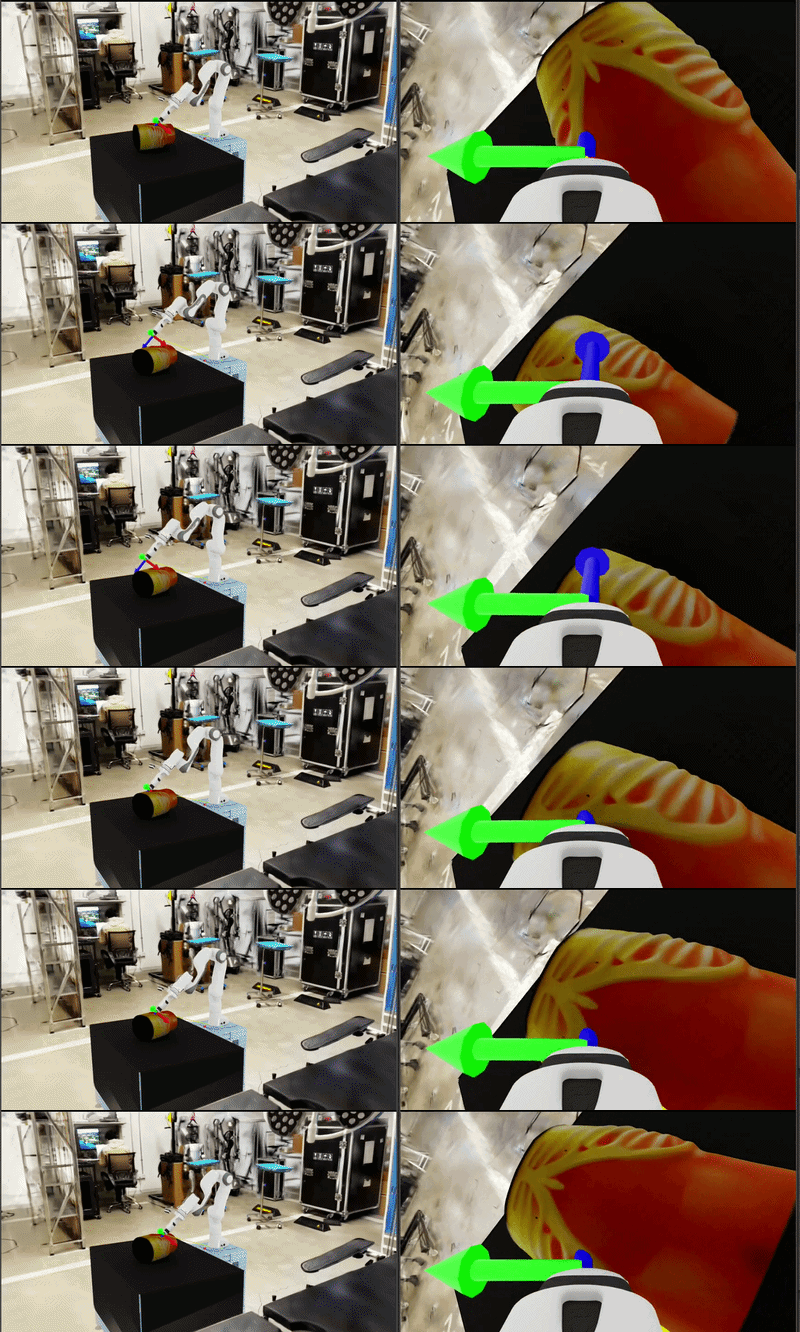
This tutorial uses the Franka ultrasound workflow as reference example. It consists of a Franka Panda arm fitted with an ultrasound probe operating in a hospital room, completing a two-phase task:
- Reach — bring the probe tip to a contact point on an abdominal phantom surface
- Scan — slide the probe to a target scan endpoint
This workflow is simple enough to understand quickly but covers every part of the pipeline: a Real2Sim hospital background, physics-enabled objects, a 6-DOF IK-controlled robot, subtask-structured demonstrations, and MimicGen data generation.
The complete reference implementation lives in
ref_workflows/franka_ultrasound/.
Building Your Workflow#
All of your workflow code lives inside the IsaacLab Arena source tree. The map below shows every file you will touch, what action to take, and which tutorial section covers it.
isaaclab_arena/
│
├── assets/
│   ├── asset.py                          ← EDIT  add USD path mappings         (01)
│   ├── background_library.py             ← EDIT  register your background       (01)
│   └── object_library.py                 ← EDIT  register your objects          (01)
│
├── embodiments/
│   ├── __init__.py                       ← EDIT  add one import line            (02)
│   └── <your_robot>/                     ← CREATE embodiment module             (02)
│       ├── __init__.py
│       └── <your_robot>.py
│
├── tasks/
│   └── <your_task>.py                    ← CREATE task definition               (03)
│
└── examples/example_environments/
    ├── cli.py                            ← EDIT  one import + one dict entry    (03)
    └── <your_environment>.py             ← CREATE environment assembly          (04)
For reference workflow, ready-to-copy snippets for each step are in
ref_workflows/franka_ultrasound/.
A Note for Developer#
Currently, adding a new workflow requires editing a few files inside the IsaacLab Arena source tree (as shown in the map above). This means your workflow code lives alongside the framework code. We are aware this is not ideal —
For now, the cleanest approach is to work on a branch of your IsaacLab Arena fork and keep your workflow additions isolated to the files listed above.
Start here: 00 — Installation · 01 — Scene Creation